I’ve had a thought about how to do my character’s hometown; make it the SAME town as I used in my previous project: Legend of Dragonstone Mountain. I was thinking of bringing some kind of plot continuity from my previos project, but I could never work out how to do it. Well, considering that I want to use the same types of map, I may as well recycle some of my own material and incorporate it into this current game. I can also bring forward all of my old skills, items, weapons, armour, and spells, and then add to them, or adjust them as required.
I know that may sound a little bit blaggy. But think of it this way; recurring game elements. It’s not an unusual concept, as most game series use the same premise. What I’d prefer to do is build upon mechanics and narrative I KNOW works. I’ll see what I can do. At the very least, I’d prefer to rebuild my old maps, as they were quite well sorted. One of the issues with the maps I’m currently testing is that I think they’re too big and spacious. If you look at the genre and time perios that I’ve been looking at, the maps were far more compact. Also, large maps leads to a need to fill them with rubbish, just to pad out the space. I know 3D games can get away with having large, detailed maps, but 2D games often have a size limit, as they used to be for handheld consoles, and now more recently, mobile devices. These consoles don’t have the memory space or power to run overly large, complicated maps as well as making the mechanics work.
So there we go. I’m gonna set up my initial story now, and then get to the statting this afternoon. So until later!
Last night, I had a little bit of a rethink about what kind of opening I want. Obviously, I dn’t want to change it too much, but at the same time, I’d like to make something a little bit more dungeon crawler-y, so I can make some simple puzzle mechanics, so it’s not all about being a total murder-hobo.
I want to stick with a forest as a low-level combat area, but I’m thinking of adding some kind of cave or ruins (or something), which could be a bit more challenging. I know thats making a little bit more work for me, but at the same time, I want to add a little variation to the gameplay.
So there we go. I should be sorting the statting and balancing out later today, and I’l show you kind of what I have, as I have it. So until then!
After using the FSM Sample Maps, I noticed something; they’re a little over-detailed, as well as being a bit to large and empty in places. I’m thinking of building some totally custom maps using the Time Fantasy asset style. Only problem is that I don’t really know where to start with it. I’ve never been particularly good at MV mapping, so I think I’d find it a struggle.
Another thing that’s happened is a little something wrong with the battle system; I was planning on using an Active Time Battle (ATB) system, but when using Olivia’s Sideview Battle UI plugin, it doesn’t show the ATB gauge. Without that one simple thing the ATB system becomes a nightmare for players. I’m looking through the plugins code to see how it draws the UI, and then modify it to draw the ATB gauge. Only thing is that I haven’t got a clue about how MV plugins go together, so I’m worried that I’m gonna break it.
If the ATB system doesn’t want to play nice, I do have a backup system called Standard Turn Battle. It’s kind of like the one used in Octopath Traveller or Final Fantasy X (yes, that one again). Personally, I’m not too happy with this chain of events, but I’m hoping to have a demo ready by sometime Saturday. I’m also putting a survey link in with it, so I can get some feedback. It’s located with the manual that I’ve put together. The manual has the controls and stats listed.
I really should dig out some of my old game manuals so I can get an idea of layout, for later in the project when I can create an illustrated one. I’m debating, if I have enough time, if I should make some promotional material for this project.
Oh, and I found out about the Diploma Show, where me, and every other art, design, and media student displays their work. It’s in roughly the middle of June, so that gives me some time to sort out some bumph for my game.
So there we have it. Like I said, I should have a demo ready soon, so stay tuned!
I’m now going to talk about one of the most defining attributes of Final Fanatsy, and indeed a defining feature of JRPG’s in general; Crystals.
Well, it’s not just “Crystals”. Basically, it’s the plot relevant McGuffin that features in just about every game ever made. Whether it be Crystals, The One Ring, or Golden Fyggs (I’m not kidding!), they tend towards being a massive driving force behind the plot.
Now, my game doesn’t really have an item that functions as a McGuffin, but as Jeanné happens to be a kind of Holy Maiden, she’s effectively the McGuffin for my plot. Her awakening powers could be used for all manner of ends, so she fits the bill quite nicely.
That doesn’t mean that I won’t use Final Fantasy style Crystals at all, but they’ll probably take on a supporting role. I’m mentioning this because it could be a nice Homage to the origins of JRPG’s. (I know that Dragon Quest came first, but Final Fantasy is more recognisable in the West)
Now, before anyone gets started about this little post being off-topic or irrelevant, it actually has a purpose. You see, this “McGuffin” thing is prelavent in just about every fictional work out there. It even features in classical mythology, with items like the Trident of Poseidon. It’s a fairly common literary trope, that no-one can truly avoid when writing.
This morning, I’ve managed to get my maps sorted, with transfer events! Actually, to tell the truth, I’m using sample maps and assets at the moment. I’d rather have something that works than something that looks pretty. It’s the first three items on my to-do-list done already, but it does leave a bit of a sour taste in my mouth; I’d rather take the time to properly create and configure the 16-bit assets I want. For now though, I’ll make do with what I have.
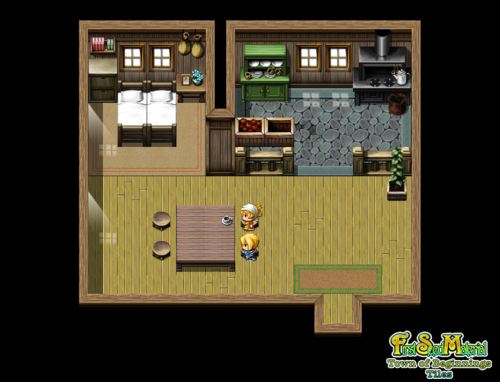
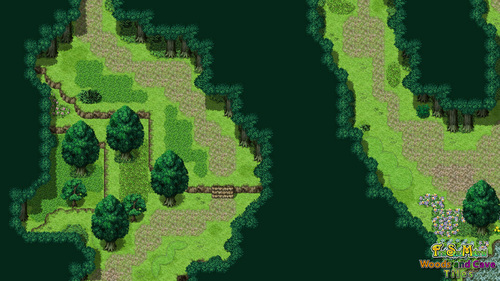
Currently, I’m using a sample pack called “First Seed Material“. There are two packs in this series; Town of Beginnings and Woods and Caves. You can guess what’s in each, but just to make sure, Town of Beginnings contains exterior and interior town maps, and the Woods and Caves pack contains, unsurprisingly, woods and caves.
These two packs use a massively high-resolution asset style, which doesn’t really fit my ideas and assets, but I’M ONLY USING IT AT THE MOMENT. I WILL BE CHANING THE ASSETS AS SOON AS THE BETA TEST VERSION IS SORTED.
I happened to have these packs lying around in my STEAM library, as I’ve been collected MV assets for ages now. Finally, they’re coming in handy!
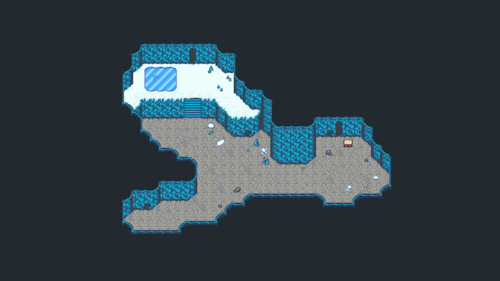
Here’s some images of the difference between the two styles, as well as the links to the asset packs:
First Seed Material: Town of Beginnings – Promotional Image
First Seed Material: Woods and Caves – Promotional Image
Time Fantasy – Promotional Image
Time Fantasy: Winter – Promotional Image
Now, before anyone gets started about me using pre-made assets: I’m not an artist. I want to specialise in technology and programming, not art. I see no issue in making up for my own limitations by getting actual artists to make the assets. That’s industry standard practice after all; each person works to their strengths. If that means that I’m gonna focus on the gameplay, then so be it. Now, back to the images. I’m going to transforming the FSM samples into the Time Fantasy style, as the other thing I’m using the samples for is to get a rough idea of map layout. I’m gonna be adjusting the actual maps to work better for me, the samples are just a good starting point. I mean, you don’t have a go at a chef for using a tin to bake a cake, do you? That’s what I’m using them for; proverbial cake tins. I’m gonna decorate the cake by hand, but the shape of the cake remains the same.
Now, you may be wondering about my earlier statement about specialising in programming. As RPG Maker MV uses a visual scripting system, you may think it’s a bit of a cheat. Not really. Unreal Engine uses a visual scripting system, and Unity has visual scripting addons. Not everyone is good at programming. I have issues understanding Syntax; I know the basics of what code conventions there are, just don’t ask me to try and program in a specific language. At least, not yet. If I can get into uni, I’ll be learning how to use Unity and Unreal, from the very beginning. That includes programming. Luckily for me though, is that all of the Time Fantasy assets are able to be used legally in both Unity and Unreal! So I can still make the games I love, in the style I prefer.
Anyways, I’m gonna go now and start getting everything ready for the first playtest this weekend, so see you later!
I’ve got until sunday morning to create a working gameplay demo, as my Mum managed to organise around fifteen playtesters to check it over. So to get it done quickly, I have an 11-Step to-do list:
Step 1 – Create Exterior Maps
Step 2 – Create Interior Maps
Step 3 – Create Transfer and Door Events
Step 4 – Organise Database and Plugins
Step 5 – Create Cutscenes
Step 6 – Alpha Test
Step 7 – Fix Issues
Step 8 – Export Beta Version
Step 9 – Create Feedback Survey
Step 10 – Create Manual
Step 11 – Share!
In order to save some time, I’ve decided to use the RPG Maker MV stock assets, as they’re already pre-configured. I can (and I intend to) swap out the visual and audio assets once the test version is done. At least that way, I can get something finished for now, and build on it later.
Another thing I want to talk about is what stage my work is at. I’m not sure what I’m working towards, which is making it difficult to gauge how much more needs doing, what needs re-doing, and what’s fine. I only have until the 24th, which is when the project will be submitted for external grading. I’m gonna push this to the ragged edge, and hopefully that’ll give the grade I need to attend uni next year.
So, there we go. I’d better get on with that. I’ll be posting screenshots at certain points, so keep an eye out!
I’ve decided to make my gameplay nice and simple. Instead of having loads of elements, skill types and what-nots, I’m gonna go simple.
I’m gonna have two skill types:
Magick – Elemental Damage, Healing, and Utility Effects
Technicks – Physical skills, such as Stealing or Sharpshooting
I’m also gonna have six elements; three physical and three magickal. The physical elements are: Slash, Crush, and Pierce. The magickal elements are: Fire, Ice, and Thunder. I’m modelling them after the elemental triad from the Final Fantasy series. Although I’d love to add loads more elements, I want to keep things nice and simple right now.
I’m also going to have a total of six character classes. Now that seems like a lot, but they each have individual strengths and weaknesses. The six classes are:
Novice (Which isn’t really a class!)
Warrior
Thief
Hunter
Mage
Priest
Each class uses a different set of weapons, armour, and skills. Whilst some are taught from items, there will be some that are taught as they rank up. The rank-based skills will mostly be passives, gained through specific training.
The aim of the game is simplicity at this stage. I’m gonna try and get this sorted out fast, otherwise, they’ll be hell to pay!
Sorry, I’ve not illustrated it, but I’m vert good at drawing, so I wrote it out instead. Instead of doing a full chapter-and-verse on each cutscene, I wrote the outline of the scene without too much detail. This allows me to adjust the scene as necessary, as well as adjust the dialogue. You see, I’m aiming my game at a PEGI 12 rating, so I have to be careful about what kind of concepts I put into my game.
Have a good look, and tell me what you think in the comments below! Until next time!
Something I’ve touched on before, but never really explored is the character development system. In lay mans terms, its the system that determines how characters grow and change mechanically. There are so many of these everywhere, so I’m only going to concentrate on a handful:
Level System – General
Esper System – Final Fantasy VI
Materia System – Final Fantasy VII
Sphere Grid System – Final Fantasy X
Job System – Bravely Default
Djinn System – Golden Sun
Vocation System – Dragon Quest VI
Skill Point System – Dragon Quest IX
Firstly, I’m going to talk about the oldest method out there: Levelling. It features in just about every game thats ever existed. The basics are that when a character gains a certain amount of “Experience Points” (EXP or XP for short), they gain a “Level” which is a rough indicator of the characters attributes and statistics. In addition, they sometimes gain abilities at certain “Levels“, such as new spells. Personally, I don’t particularly like this system, as I find it way too arbitrary. People don’t suddenly learn new skills, do they? That’s why I’m going to look at varying different systems, to see which one I prefer. I may even combine aspects into something original!
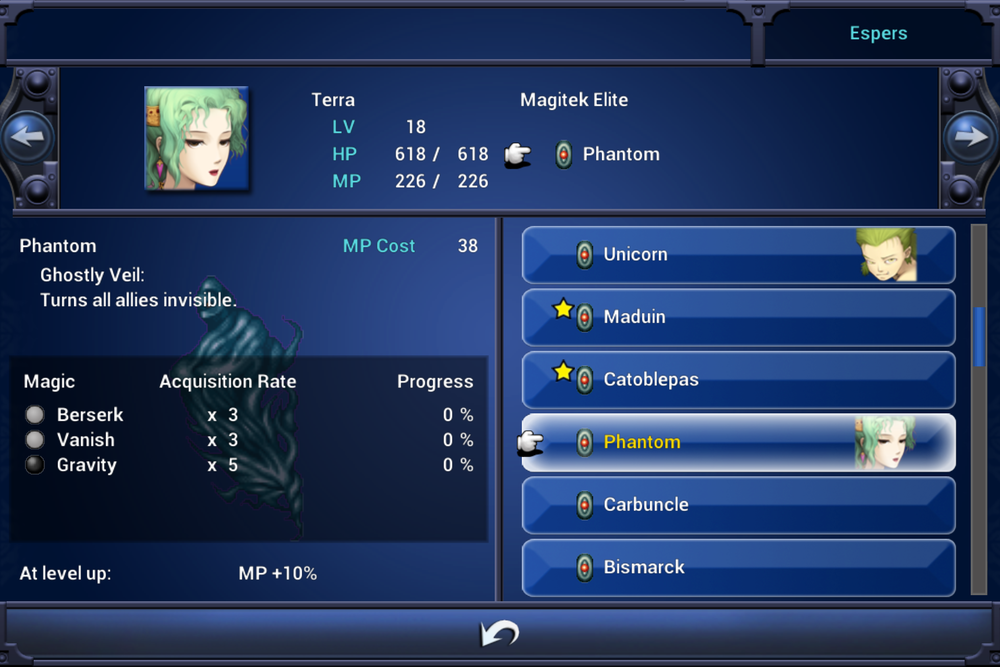
Next one on my list is the Esper System from Final Fantasy VI. Once you unlock the ability to use Espers, you can assign one to a character. Now the “Esper” does two things. Firstly, when a character “Levels“, they modify the character’s attribute increases, such as giving +1 attack power. The second thing they do is teach the character how to cast spells.
Final Fantasy VI – Esper Menu (iOS)
As can be seen from the above menu, the character gains spells from having the “Esper” equipped, with different “Espers” teaching different spells, and at different speeds. Once a character has 100 “Ability Points” (AP for short), they then learn that spell. They then keep that spell, even if the “Esper” that’s assigned to them is changed. The third thing an “Esper” grants the assigned character is the ability to summon the “Esper” itself, which has an effect on the battle, such as damaging enemies, healing allies, or another effect.
The next one I’m looking at is Final Fantasy VII’s “Materia System”. Similarly to the “Esper” system, you assign character’s “Materia”, which grants the character spells, skills, and stat increases. There are some major differences though. First of which is that the skills are not permanently learned; you have to keep the “Materia” equipped in order to use the ability. Secondly, the stat modifications are only whilst the “Materia” is equipped, so the character will lose the bonuses of having it equipped if removed. Interestingly, each “Materia” also imposes stat minuses as well, in order to balance the character out. These minuses are removed in the same way as the bonuses. AP makes a return, but instead of being assigned to the character, each “Materia” retains the AP thats gained. Once the “Materia” has reached a certain number of AP, it grows in power, and once mastered, spawns a brand new “Materia” with no AP, so you can spread abilities around your party.
Final Fantasy VII – Materia Menu (PS)
One other difference this system has is that the “Materia” has to be assigned to the characters equipment, rather than the character themselves. Each item has a number of “Materia” slots, and some items have linked slots. Some types of “Materia” work better when linked to another type. Talking of types, there are FIVE types of “Materia“, each with different colours and properties:
Magic Materia – Materia that grant spells. (Green)
Summon Materia – Materia that allow characters to summon (Red)
Command Materia – Materia that gives new skills, such as steal (Yellow)
Support Materia – Materia that enhances other Materia that it’s linked with (Blue)
Independent Materia – Materia that enhance stats, or have other effects (Purple)
The Materia system is interesting, as it allows the player to chop-and-change the character’s abilities on the fly, without having to commit to having fixed abilities.
Another Final Fantasy system is the “Sphere Grid” from Final Fantasy X. AP makes another return, but this time in a completely different way. When characters battle, if they participate, they gain AP at the end. In this system, AP works more like a traditional XP system, as when a character gains enough AP, they go up a “Sphere Level”. Characters can spend these Sphere Levels to move along the Sphere Grid. The Sphere Grid is made up of various nodes, along a path, somewhat reminiscent of circuitry. Each node requires a certain Sphere to buy. These Spheres are obtained through treasure chests, monsters, and certain other places. A character can buy an ability or stat increase in a node that they’re on, or adjacent to. Each character starts on a certain place on the grid, and they work their way around the grid, growing stronger as they go.
Final Fantasy X – Sphere Grid (PS3)
The main drawback of the system is the need to constantly rotate party members in battle in order to get them AP. This works fine for Boss fights, but for random battles, it’s extremely tedious, especially when you start being able to kill monsters in one hit. One interesting thing about the system comes from the character of Yuna, who has the ability to summon powerful creatures called Aeons. When Yuna unlocks stat nodes on the Sphere Grid, her summoned Aeons gain the bonus as well!
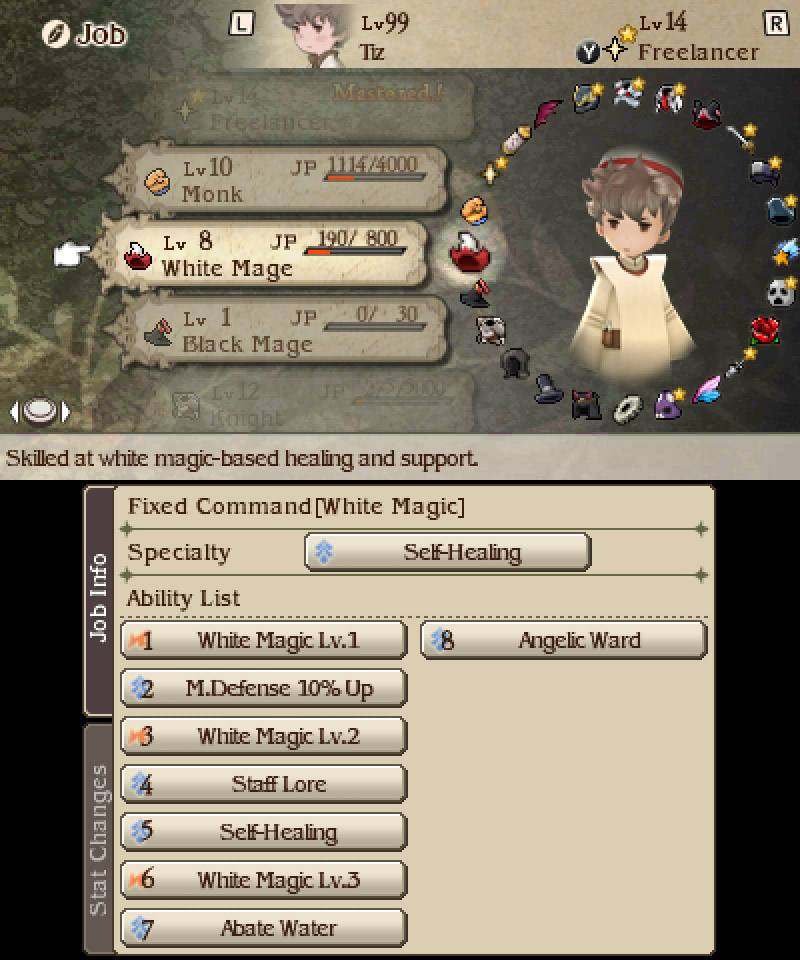
Bravely Default uses a more standard form of level based development, with a twist. Each character does have levels, which influence their stat growth, but these levels are separate from their character class, or “Job“. Each job has levels, which grow by the accumulation of “Job Points” (JP). Each Job can level up until level 14, whereupon it’s mastered. Mastered Jobs only really affect the FreelancerJob’s “Late Bloomer” ability, which provides a stat boost based on how many Jobs that character has mastered. Each Job Level grants access to new abilities and passive skills (called “Support Abilities“), as well as influencing the characters stat growth when they level.
Bravely Default – Job Menu (3DS)
Abilities are learned automatically upon unlocking them, whereas spells must be bought from magic shops. Even if you buy a spell from a magic shop though, it still doesn’t automatically give the character the ability to use it. They have to have the relevant ability from a magic-using character class (such as “Black Magic” from the “Black Mage”Job). This system first originated in Final Fantasy III, further refined in Final Fantasy V, and then perfected in Bravely Default.
Golden Sun has an interesting level-based mechanic called Djinn. The Djinn are elemental creatures that can be assigned to the character (similarly to the Esper system), granting new spells and stats. Only difference is that, whilst each character levels up in the traditional manner, the spells they know are determined by certain quest-gained items, or through having assigned Djinn.
Golden Sun – Djinn Menu (Part 1) (GBA)
Golden Sun – Djinn Menu (Part 2) (GBA)
As you can see, the Djinn menu is broken up into two halves, the first one showing which Djinn are assigned to which character. The Djinn’s names appear in different colours depending on their status; Set, Standby, or Recovery. A set Djinn gives access to spells and stat increases. A standby Djinn doesn’t provide spells or stats, but can be used to call upon powerful summons such as Thor. A Djinn in recovery has just been used to summon, or has been subject to the Djinn Storm spell. They cannot be set to characters or used to summon, until they have recovered, at which point they are automatically returned to being set. The second screen shows what changes occur when the Djinn is being set or placed on standby, including stat changes and what spells the character will be able to use. All the character class in Golden Sun does is tell the player at a glance what kind of abilities the characters now have, based upon the assigned Djinn.
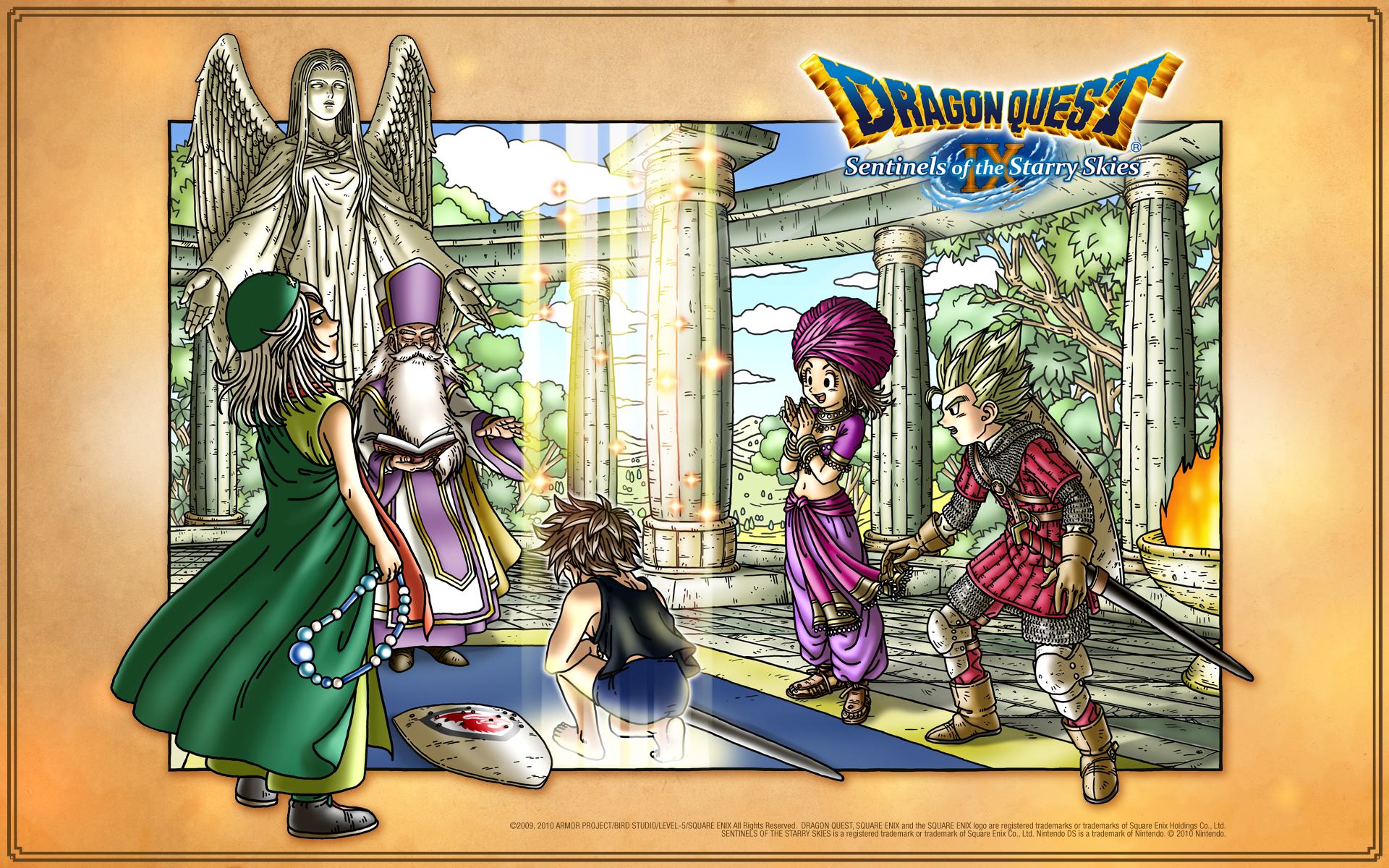
For the final one I’m looking at, I decided to go with the Dragon Quest series. Now these next two are similar so I’m listing them together for ease of reading. Firstly, I want to talk about Dragon Quest VI’s “Vocation” system. It’s like an advanced form of character classing, except that characters retain abilities gained between Vocations. By fighting a certain number of battles, the character gains new abilities by “Ranking Up” their Vocations. Some Vocations are only unlockable by mastering other Vocations. Characters change between Vocations by visiting the Abbot of Alltrades Abbey, Jack (Jack-of-Alltrades, a little bit of a joke, huh?).
Dragon Quest IX – Official Art – Vocation Changing (DS)
Now in Dragon Quest IX, this system is used again with some slight changes, but the only relevant one for here is the Skill Point System. At certain levels, each character gains a number of “Skill Points” which may be spent on specialist abilities, kind of like a talent tree system.
See what I meant when I said there were loads of systems out there? Well, out of all of them, I’m tempted by a combination of the Esper System (FF6), the Materia System (FF7), the Job System (BD), and the Vocation System (DQ). Now this may sound overly complex, but hear me out; I want to use the Job and Vocation systems to influence the character’s stat growths, and use a combination of the Esper and Materia systems to teach them skills and spells. I would use some of the other two’s mechanics, but they would be far to difficult to replicate right now. Using the combination I’ve gone for makes it feel more organic to me, especially given my plot structure of having various “VocationalGuilds” attached to the Adventurers Guild. (See, I’m marrying my plot and gameplay). It also helps me work out abilities, as I can decide which ones could potentially be learned at what point in the narrative.
So there we have it! One of my core gameplay features sorted!
So, I’ve been looking back at both my project proposal and project plan, and I’ve noticed something; I’ve bitten off more than I can chew. My proposal detailed a highly ambitious project, and the project plan was supposed to be followed to make it possible. However, due to unforseen circumstances, it appears that I’m not going to be able to do everything that I wanted to do. So I’ve decided to scale it back a few steps.
Instead of having an epic opening, I’m going to have a more low-key introduction that allows me to properly place in-game tutorials for the players benefit. I’m also going to throttle back the main plot that I had planned. I wanted to include a massive war, castle-building city-sim elements, and a full blown character development system. Instead, I’m going to focus on more of an adventuring party dynamic, inspired by Grimgar, as I mentioned in a previous post. I’m not sure if I’m gonna be able to include any of the city-sim elements, but to be frank, it’s not a great loss. All I was trying to do with that one was show off what systems I could produce using RPG Maker MV‘s eventing system. But now, I’d rather get a solid core gameplay experience set up, and worry about massively complex mechanics later.
I am still going to have a story driven main questline, but I’m gonna use a quest system for the most part. It’s very similar to the Pokémon Mystery Dungeon series, where the main story is interspersed with quests that the player can undertake in order to gain experience, money, and items. By doing it this way, I can keep my storyline simple and effective, without too much exposition or boring level-grinding.
I have three and a half weeks at this stage to get this entire project finished, so this has to work. No second chances.





 SLGameDesign FMP