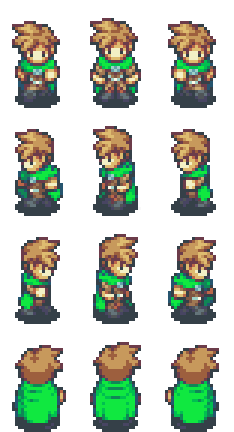
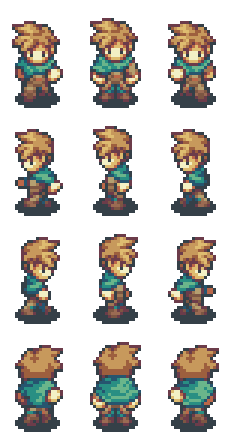
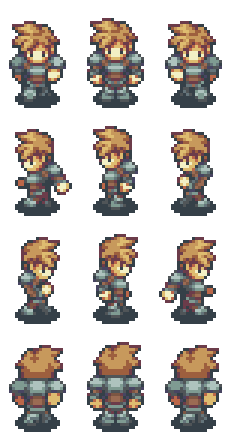
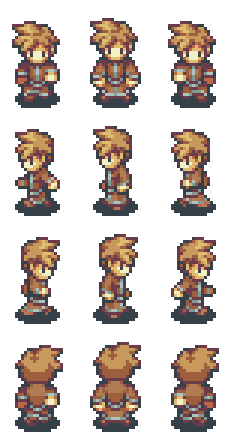
Character Sprites – Completed!

Hi everyone!

As you may remember, I started making some custom character sprites for my project (as shown here: https://sldesignfmp.game.blog/2019/04/25/character-sprites/). It’s taken me (on and off) about a month to get them finished. Have a look at these:
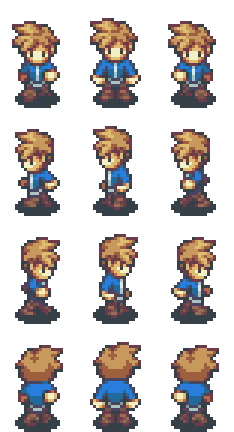
One thing that I had real issues with was the cloaks on the Mage and the Hunter costumes. Trying to replicate the way fabric behaves in 16-bit pixels is surprisingly difficult, as you have to make the sprite be a consistent size and shape, but luckily I had some test shots of people wearing cloaks (https://sldesignfmp.game.blog/2019/03/20/character-designs/), which helped me get some bearing on how to fabric would behave with regards to lighting and appearance. It particularly helped me with the Hunter, as the test shots showed people wearing a cloak on top of armour, which makes it look a little bit different, especially around the shoulders. Although the Thief is wearing a piece of fabric around his neck, it’s more of a scarf or a mantle, which made it much easier to contend with.

The ones I really like the most are the Priest and the Warrior. The priest design was completely based on the brown monk robe that I used in my original test shots, which made it so fun to work with. I like the warrior because it’s very strking; you know he’s an handly lad in a fight.

The reason why I’ve made the same character six times in different outfits is due to my character class system. Traditionally, when a character changes class, the sprite changes to one that reflects the nature of the class. For example, when a character becomes a warrior, they look as if they’re wearing metal armour; conversely, a mage would look as if they’re wearing robes. It’s primary purpose is to provide important visual information to the player.

The only issue with creating all of the spritesheets is the time required to make them. It can take me a whole day just to make one spritesheet! So for now, I’m going to stick with having only two main characters, as I don’t have the time to make a full roster.

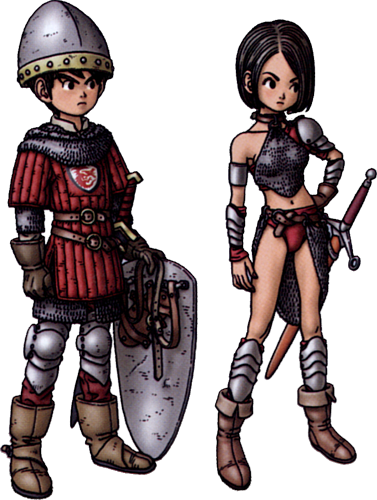
Also, these costumes are just for male characters. Female characters use different, but still similar costumes, so the player can differenciate whether or not the character is male or female; but at the same time, they are still similar enough to show the player what class they are. For example:
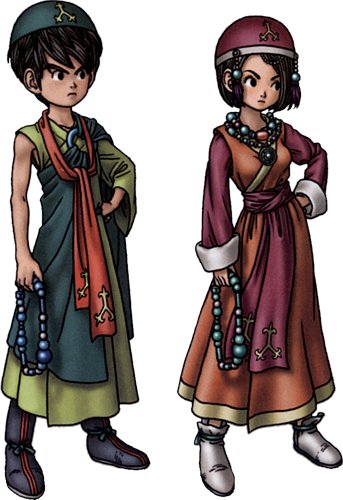
These are perfect examples of what I mean. The male and female outfits are both similar, and distinctly different. Yet they are both identifiable as their respective classes.

If I have time, I may show you the female outfits, but if I don’t show them, at least you’ll understand the concept that I’m trying to use here.

Anyway, that’s it from me for now. I’ll see you later!

Bibliography:

Square Enix (2009). Priest Vocation. [image] Available at: https://dragonquest.fandom.com/wiki/Priest [Accessed 23 May 2019].

Square Enix (2009). Warrior Vocation. [image] Available at: https://dragonquest.fandom.com/wiki/Warrior [Accessed 23 May 2019].

Music and SFX

Hi everyone!

So today, I’m gonna talk about something that I havent really covered; Music and Sound Effects (SFX). And I’m going to start by saying this; yes, I am using licenced Music. I haven’t got the skills or the time to create my own, so I invested in some appropriate music.

As I use RMMV via STEAM, that’s where I happen to get all of my assets from, music included. I generally wait for a STEAM Sale (which happen every few months) before buying anything though. Although I do need to use pre-made music, I’m not paying silly money for it. Actually, I already owned everything other than the last one on the list below.

Now, I’m using FOUR seperate Music and SFX packs, although three of them are interconnected. Here’s the list of what asset packs I got, as well as where I got them from:

As to who made them, the 8-Bit Perfect Collection was made by Moppy Sounds, and was DESIGNED to work with the Time Fantasy assets, as the pack also comes with an exclusive Spritesheet in that style. The Retro Fantasy Music Packs were all made by Joel Stuedler, and the reason I’m using them is that the 8-Bit Collection doesn’t have any Music Effects, which could be classified as Sound Bites. They’re generally played when the player sleeps at an inn, or wins a fight. They’re quite handy for making scenes that little bit more epic.

Anyhow, that’s enough of that. If you like, you can check out all of the music I’m using via the links, as well as Soundcloud. So I’ll see you later!

Bibliography:

Store.steampowered.com. (2017). RPG Maker MV – 8-bit Perfect Collection on Steam. [online] Available at: https://store.steampowered.com/app/631500/RPG_Maker_MV__8bit_Perfect_Collection/ [Accessed 23 May 2019].

Steudler, J. (2018). RPG Maker MV – Retro Fantasy Music Pack on Steam. [online] Store.steampowered.com. Available at: https://store.steampowered.com/app/947741/RPG_Maker_MV__Retro_Fantasy_Music_Pack/ [Accessed 23 May 2019].

Steudler, J. (2018). RPG Maker MV – Retro Fantasy Music Pack Vol 2 on Steam. [online] Store.steampowered.com. Available at: https://store.steampowered.com/app/979464/RPG_Maker_MV__Retro_Fantasy_Music_Pack_Vol_2/ [Accessed 23 May 2019].

Steudler, J. (2019). RPG Maker MV – Retro Fantasy Music Pack Vol 3 on Steam. [online] Store.steampowered.com. Available at: https://store.steampowered.com/app/1051434/RPG_Maker_MV__Retro_Fantasy_Music_Pack_Vol_3/ [Accessed 23 May 2019].

Project Plan – Who, What, When, etc.

Hi there!

Right now, I’m going to look at the project plan I outlined at the start of this whole thing:

https://sldesignfmp.game.blog/2019/03/14/project-plan/

So, I can tell this just from a casual glance; it hasn’t gone exactly according to plan. I suppose that’s to be expected though. They say that no plan ever survives first contact with the enemy, so I at least expected some issues. That’s why I changed my project plan to the Excel spreadsheet method. I used it to get back on track, but this post is talking about my original plan, to see if it it would still be valid.

But looking closer, I was totally overambitious with how long I thought that things would take. I’ve even had to scrap some of the things I wanted to do due to time constraints. For example, I was planning to do a full audience profile. Unfortunately, I haven’t been able to do one, as I’ve been too busy trying to actually design my game.

It also states in the plan that I’d spend about 5-6 weeks on production. In reality, I’ve had about 3 weeks to get things sorted. Again, another gross over-estimation of my own capabilities.

I guessed that as I’ve plenty of experience with the engine, and the game genre, that this would be easy for me. Boy was I wrong. This has been a bit of nightmare to be frank with you. I suppose you could say that my own arrogance got the better of me. This whole experience has been quite humbling. I now know not to get big-headed about things.

I guess there is a lesson to be learned from all of this; be realistic. I obviously thought that this would be a simple matter. It hasn’t been. It’s been like a rollercoaster, with all manner of twists and turns lurking around every corner. So I guess that I’ve at least learned something from the experience; don’t get arrogant. Just do what’s achievable. I suppose that’s something positive at least.

The new plan works so much better than the original, as it allows me to index all of my work for easy access. I’m actually happy that I made the switch, because as you can see, my original plan would have caused me major issues, due to it’s complete inflexibility.

Final Stretch – TO-DO-LIST

Hi everyone!

So I’ve only got a few days until submission, so I’ve come up with a TO-DO-LIST for the last stages. Hopefully, this should keep me on track until submission.

There’s a lot to do, as well as a lot to sort out. With a bit of luck though, this shouldn’t be too difficult to accomplish. As I’ve said before, the grade I get for this project determines whether or not I get into University next year. I’ve been working towards this for SEVEN YEARS now. I am not going to let it slip. I’m going to get there. WHATEVER IT TAKES.

Dev Log #10

Hi everyone!

I’ve been sorting out the prologue’s various cutscenes over the last week, using the storyboard that I posted earlier: https://sldesignfmp.game.blog/2019/05/01/prologue-storyboard/. I know the storyboard is quite vague, but as this isn’t a film or TV production, it doesn’t need to be. The players (by definition) will have to watch the cutscenes, but they’re also there for the gameplay aspects as well. So I deliberately left the specifics of their dialogue out to give me some creative freedom.

I’ve also been looking at the use of McGuffin (or Mary Sue) type mechanics in gaming (as shown here: https://sldesignfmp.game.blog/2019/05/02/crystals/), and realised that Jeanné (my main female protagonist) is in effect a McGuffin in terms of the story. She is the lynchpin of a major plot centric event (in fact, the main plot!). So yeah, I think it’s good to understand their place in fiction.

I’ve only got a few more cutscene parts to sort out, and hopefully they should be done by the end of Friday! So stay tuned!

Dev Log #9

So, after spending three days trying to figure out what was wrong with the code that I outlined in Dev Log #8 (https://sldesignfmp.game.blog/2019/05/20/dev-log-8/), I finally figured out the error. It was a minor error. I was using an “Else” statement, rather than what I should have been using; an “Else If” statement. It’s a seriously simple syntax error, but thankfully it’s no fixed. So now the code reads:

  • <Custom maxhp Formula>
  • if (this.name() === ‘Jeanné’) {
    • value = level * 3 + 8;
  • } else if (this.name() === ‘Tommyn’) {
    • value = level * 3 + 12;
  • } else {
    • value = level * 3 + 10;
  • }
  • </Custom maxhp Formula>

All of the others I listed in the previous Dev Log work in exactly the same way, except that the numbers are different. But yeah, total schoolboy error. Fixed now though.

Dev Log #8

Hi everyone!

This Dev Log’s a bit of a mixed bag; I’ve made some astounding progress in creating custom character sprites, but my mapping needs a lot of work. Let’s start with the positive. I’ve managed to finish the sprites for the Male Warrior and Male Thief. I’m planning on using the same costume with different faces and hair to denote the different characters. I’ve still got to finish off each characters default appearance, as well as the Male Mage, Male Priest, Male Hunter, and all of the female sprites. In case your wondering why I’m differenciating based on gender; when working in 16-bit, you have to be able to clearly see the characters biological gender. Otherwise, you won’t know what they’re meant to be.

Now some negative; I have no idea where to take my mapping from here. I have a list of maps that need to be created:

  • Main Town
  • Main Town Interiors
  • Second Forest Area
  • Cave

That sounds quite simple, right? Wrong. Very wrong. It’s actually harder to do, as I’m not using a massive overworld map, so these maps all have to look connected. I think I have a solution though; Region Mapping. Well, ot quite how I described before. Instead of converting maps, I’m thinking of using Region ID’s to mark where the entrances, exits, and water should go. Then I can create a map with connecting pieces. I may even break the larger maps down into segments to make life a bit simpler.

Something else I’ve been working on is my character class balancing. It’s quite a dull thing really, as its all just Maths. Only problem is that the Plugin (One of Yanfly’s) I’m trying to use to make it work desn’t seem to want to do what I want it to do. I’ve looked in the documentation, and found a section of code that appears to do what I want. Only issue is; it isn’t. I’ll show you the absolute monster of JavaScript code that I’m trying to use:

  • <Custom maxhp Formula>
    • if (this.name() === ‘Jeanné’) {
      • value = level * 3 + 8;
    • } else {
      • if (this.name() === ‘Tommyn’) {
        • value = level * 3 + 12;
      • } else {
        • value = level * 3 + 10;
      • }
  • </Custom maxhp Formula>
  • <Custom maxmp Formula>
    • if (this.name() === ‘Jeanné’) {
      • value = level * 3 + 7;
    • } else {
      • if (this.name() === ‘Tommyn’) {
        • value = level * 3 + 3;
      • } else {
        • value = level * 3 + 5;
      • }
  • </Custom maxmp Formula>
  • <Custom atk Formula>
    • if (this.name() === ‘Jeanné’) {
      • value = level * 3 + 3;
    • } else {
      • if (this.name() === ‘Tommyn’) {
        • value = level * 3 + 7;
      • } else {
        • value = level * 3 + 5;
      • }
  • </Custom atk Formula>
  • <Custom def Formula>
    • if (this.name() === ‘Jeanné’) {
      • value = level * 3 + 3;
    • } else {
      • if (this.name() === ‘Tommyn’) {
        • value = level * 3 + 7;
      • } else {
        • value = level * 3 + 5;
      • }
  • </Custom def Formula>
  • <Custom m.atk Formula>
    • if (this.name() === ‘Jeanné’) {
      • value = level * 3 + 7;
    • } else {
      • if (this.name() === ‘Tommyn’) {
        • value = level * 3 + 3;
      • } else {
        • value = level * 3 + 5;
      • }
  • </Custom m.atk Formula>
  • <Custom m.def Formula>
    • if (this.name() === ‘Jeanné’) {
      • value = level * 3 + 7;
    • } else {
      • if (this.name() === ‘Tommyn’) {
        • value = level * 3 + 3;
      • } else {
        • value = level * 3 + 5;
      • }
  • </Custom m.def Formula>
  • <Custom agi Formula>
    • if (this.name() === ‘Jeanné’) {
      • value = level * 3 + 5;
    • } else {
      • if (this.name() === ‘Tommyn’) {
        • value = level * 3 + 6;
      • } else {
        • value = level * 3 + 5;
      • }
  • </Custom agi Formula>
  • <Custom luk Formula>
    • if (this.name() === ‘Jeanné’) {
      • value = level * 3 + 6;
    • } else {
      • if (this.name() === ‘Tommyn’) {
        • value = level * 3 + 5;
      • } else {
        • value = level * 3 + 5;
      • }
  • </Custom m.def Formula>
  • <Custom Class Parameters>
    • exp = 5 + level * 10;
  • </Custom Class Parameters>

The only thing I can think is that either the base Plugin parameters are interfering with these formulae, or that I’ve written them wrong. As it stands right now, they’re not working.

Anyway, I’ll try and crack on with all of this, so I’ll see you later!

Let’s Look Back

Hi everyone!

So today, I’m gonna have a look back at my original project concept, and see what’s happened with it. To be honest, I’m expecting to see some changes, but let’s see:

Project Concept:

Based on my Pre-Production research, the aim of the project is to create a Japanese-style Role-playing Game inspired by games such as Final Fantasy, Dragon Quest, and Fire Emblem. I am intending to use a 2D 16-Bit Pixel Art style, reminiscent of games released during the 1990’s and early 2000’s. Typically, JRPG’s have complex plots of epic proportions, so I intend to create a demo of my game, which will consist of the beginning of the story. I am also planning on using a medieval-inspired fantasy setting for this project, which is a standard trope of the RPG genre as a whole. Although there are common conventions in the JRPG genre, I will also be adding some additional features, such as a custom battle system.

  • This first section of the concept seems to be in order. I mean, I’m making a JRPG. I’ve added a slightly customised battle system, so that part’s there. And I am using a 16-bit pixel style. So good so far. Oh, and I’ve looked at several Final Fantasy games, which was my primary source of inspiration for this. So again, done.

I’ll be looking at historical sources on medieval history, as well as fantasy literature and other RPG’s to provide context for this project. There will also be visits to appropriate medieval sites such as castles, to provide visual and contextual references. I will also need to perform an audience profile, to identify my target demographic. For all of my research, I will be using a wide variety of secondary research media, such as books, podcasts, videos, and games. I will also be using various primary research methodologies and techniques, such as surveys, focus groups, and interviews.

  • Ok, this part has suffered. I haven’t been able to visit any medieval sites at all. The audience profile hasn’t been done either. I have been looking at existing games though. So all in all, ONE THIRD of this section’s been done. That is not good at all. Also, when it comes to research techniques, I’ve only really been doing secondary research. I tried some primary, but it didn’t come to anything. To be honest with you, I believe that no-one really cares about my project, so trying to get any primary research sources is going to be a strain.

The three phases of this project are Pre-Production, Production, and Post-Production. In the Pre-Production phase, I will be compiling my research and using that to create a variety of material on how I’m going to create my game, and what I’m going to include or exclude from the project. During the Production phase of the project, I will actually be creating and modifying assets, as well as developing the playable section of the game. Once I have completed the Production stage, I can move onto Post-Production, during which I’ll be finalising the demo and creating the exported version ready to be presented.

  • This last part seems to be going OK, as it’s the production phase. I’m currently on that now, so hopefully it should abide by the proposal. I’ve also demonstrated some of the assets that I’m making, so that’s in there too.

Overall, I’ve stuck to what was really quite a vague concept. I think my production would have worked so much better if my concept was more definitive. So far, I’ve only got a small area of my game done, and then not even to completion at this point. Next time I do anything like this, I’m gonna create a much more rigid definition of what I’m making.

So there we have it! Looking back, I wish I could do this project again, as I could do it so much better now. That’s the beauty of hindsight. But I’m gonna see this through to the end now, and next time I shouldn’t make so many basic mistakes in my project management. Live and Learn I suppose.

I’ll be back soon with some more Dev Logs.

Dev Log #7

Hi everyone!

Finally fixed the Monster Spawn system!!! Took me a while though. What happened was I used the wrong type of command; I was supposed to use a Script Call, rather than a Plugin Command (Whoops!!!). I’d also gotten two variables mixed up; one for the amount of monster events, and the other for how many monsters you’d be able to fight. With those two mixed up, the game couldn’t actually set up the battle screen, even once I’d sorted the spawning system.

So, yeah, that’s taken all evening to figure out. Hopefully tomorrow I can finish the intro cutscenes and maybe even add some shops! So until later!

Dev Log #6

Hi everyone!

So, I decided to create my forest map, which I’m using as the intro to the first major area. I used one of RMMV’s sample maps to start with, and then using my region mapping technique (detailed here: https://sldesignfmp.game.blog/2019/03/29/change-of-approach/), I modified it extensively. I’m not too happy with relying on sample materials, but I’m a bit pressed for time, and the layout works quite nicely. Here’s the sample:

RPG Maker MV – Forest Sample Map

And here’s what I’ve done with it:

Forest Sample – Retro-styled

Due to the fact that my sprites are twice the size of the chibi’d default sprites, I’ve had to increase the size of some of the terrain features to compensate. I’ve also added some additional cliffs, with layers of foliage to create a level of depth to an otherwise bland layout. I tried to make sure that the modifications fit with my custom village map, as I’m trying to avoid the need for a “world map”. In some JRPG’s, there’s an overworld map, with settlements and dungeons highlighted. But I’m not doing that. I much prefer the way that Pokémon and Legend of Zelda do their mapping, with a contiguous map.

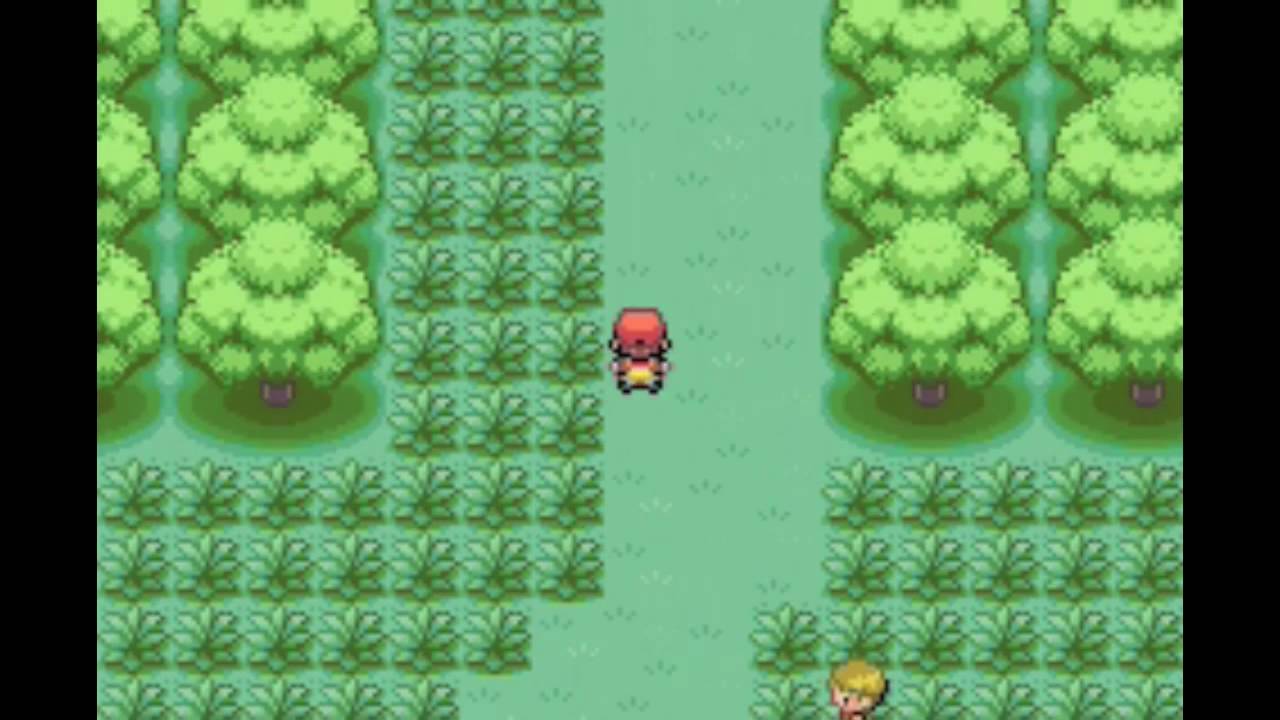
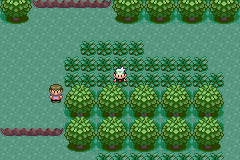
Now, why have I chosen a forest as the first “dungeon” area? Well, again, it leads back to Pokémon (specifically; FireRed/LeafGreen and Ruby/Sapphire/Emerald). In many of the earlier games, the first proper area you have to traverse is a dense woodland (such as Viridian Forest or Petalburg Woods). These areas are normally replete with low-level bug, grass, and poison type Pokémon that aren’t too hard to catch or defeat. Now, I’m going to use the same principle, as it works. Here are some images of the maps I’m talking about:

It’s nice and gentle, easing the player into the game mechanics without being overly tedious. It also gives them a chance to level in a relatively safe environment. Obviously, there’s going to come a point where they find the area too easy, but that’s when they’ll want to move onto the next bit of the game. (Pacing is important)

One issue that I’ve come across; I’ve tried to setup a random spawn system to generate random encounters. Only issue is that it doens’t work. I’ve set up a private variable to generate a random number between 3 and 6. I chose these numbers due to the size of the map; too few and it won’t be interesting, too many and the map gets too cluttered and impassable. I’m using a combination of Yanfly’s Plugins to make this system work;

Yanfly Engine Plugins – Event Spawner
Yanfly Engine Plugins – Self Switches and Variables

By default, RMMV can’t do instanced or private variables, which is what the Self Switches and Variables is designed to add. The Event Spawner allows me to spawn various template events onto other maps. It can do this via direct designation, direct designation based on variables, or based on Region ID’s. I’m using Region ID’s for this, as it’s nice and simple. Also, because I want monsters to spawn in long grass, like they do in the Pokémon series.

Only, it doesn’t want to work, and I can’t figure out why. I’m going to have to look at how I’m doing it, as I may have missed something.

Anyway, I’ll get on with that, and I’ll be back soon!

Bibliography:

YouTube. (2018). YEP.170 – Event Spawner – RPG Maker MV. [online] Available at: https://www.youtube.com/watch?v=ER1ZvfAjUXc [Accessed 16 May 2019].

YouTube. (2018). YEP.113 – Self Switches & Variables – RPG Maker MV. [online] Available at: https://www.youtube.com/watch?v=BwcI5OimnHc [Accessed 16 May 2019].